Review allocations, available-to-ship counts, and item matches before the outbound shipment document leaves.
EDI software + warehouse sync
Keep EDI, shipments, and inventory moving together.
Syncora is a Windows desktop app for receiving EDI documents, building outbound replies, checking partner setup, watching ECGrid traffic, and keeping shipment work close to warehouse inventory.
850 / 855 / 856 / 810 / 846 / 997
desktop EDI workstation
warehouse sync
856 shipment write-back
partner setup
ECGrid visibility
Product Snapshot

Syncora / desktop EDI app
Receive, build, send, check inventory, and track the file trail without hunting through five places.
When a shipment is sent, Syncora can write the movement back instead of leaving stock cleanup for later.
Create inventory advice from the balances already in the app, without retyping the same numbers somewhere else.
Keep mailbox activity, parcel IDs, file references, and sent times tied back to the document.
Why this product exists
EDI is already the hard part. The program should not add more fog.
Use the words people already use.
Received. Sent. Connections. Templates. Issues. Activity. The app names the work plainly so someone can open it and know where to start.
Inventory should be next to shipment work.
If the warehouse is the source of truth for what can ship, that information should be visible before an ASN or inventory advice document is sent.
Small enough to understand. Serious enough to run the EDI desk.
How Work Moves
Receive the order, build the reply, send it, and keep the warehouse in sync.
Receive and review
Open incoming documents, read the useful details, and catch problems before they turn into a rejected file.
Build with inventory context
Use partner setup, templates, and inventory counts while building acknowledgments, ASNs, invoices, and inventory advice.
Sync shipment and stock
Send the document, update stock when it makes sense, and keep a record of what happened.
The Program
What the desktop app handles.
Received and sent documents
Review inbound and outbound files with summaries, raw X12, timestamps, status, and draft payloads close by.
Partner setup that stays findable
Keep partner records, map keys, communication settings, and starter maps in the app instead of scattered across notes and old config files.
Warehouse sync and inventory advice
Build 856 shipment notices and 846 inventory advice with stock, allocations, and ECGrid send status nearby.
Supported Documents
The documents Syncora is built around.
These are the main documents handled in the working app. There is also a larger catalog for partner setup, starter profiles, preflight checks, and mapping work.
Core documents
850
Purchase Order
Receive the customer's order and keep the PO tied to later shipment and invoice work.
855
Purchase Order Acknowledgment
Send back what was accepted, changed, or rejected.
856
Advance Ship Notice
Build ASNs with shipment IDs, pack detail, item detail, and inventory checks.
810
Invoice
Create invoice work from the same partner and transaction context.
846
Inventory Inquiry / Advice
Send inventory advice from current balances.
997
Functional Acknowledgment
Track and generate acknowledgments so partner feedback does not disappear.
Inside The Software
It is arranged around the screens people actually use.
Inbox, outbox, and document detail
The Received and Sent screens show timestamps, summaries, raw X12, draft payloads, and status so you can see what happened without opening three other tools.
Partner setup and map control
Partner records, communication methods, outbound map keys, and transaction-specific setup stay together so onboarding does not depend on memory and mystery files.
Warehouse-aware outbound flow
856 and 846 work can sit beside balances, movement, and inventory-applied status, so shipment communication matches what the warehouse knows.
What stays visible
Transport details, ECGrid parcel and file references, sent timestamps, issue follow-up, activity history, and warehouse context stay attached to the document.
What the builders do
Syncora helps teams review incoming demand, build 855, 856, 810, 846, and 997 outbound drafts with partner context, and send them without jumping between a mailbox, spreadsheet, and second inventory tool.
Where the free translator fits
The browser translator is for quick previews and sample conversions. The Windows app is for the real daily work: partners, files, sending, tracking, and inventory.
Real Screens
This is the actual workstation, not a polished mockup.
These screenshots are from the Windows app, so you can see the real inbox, sent queue, partner setup, and inventory screen.
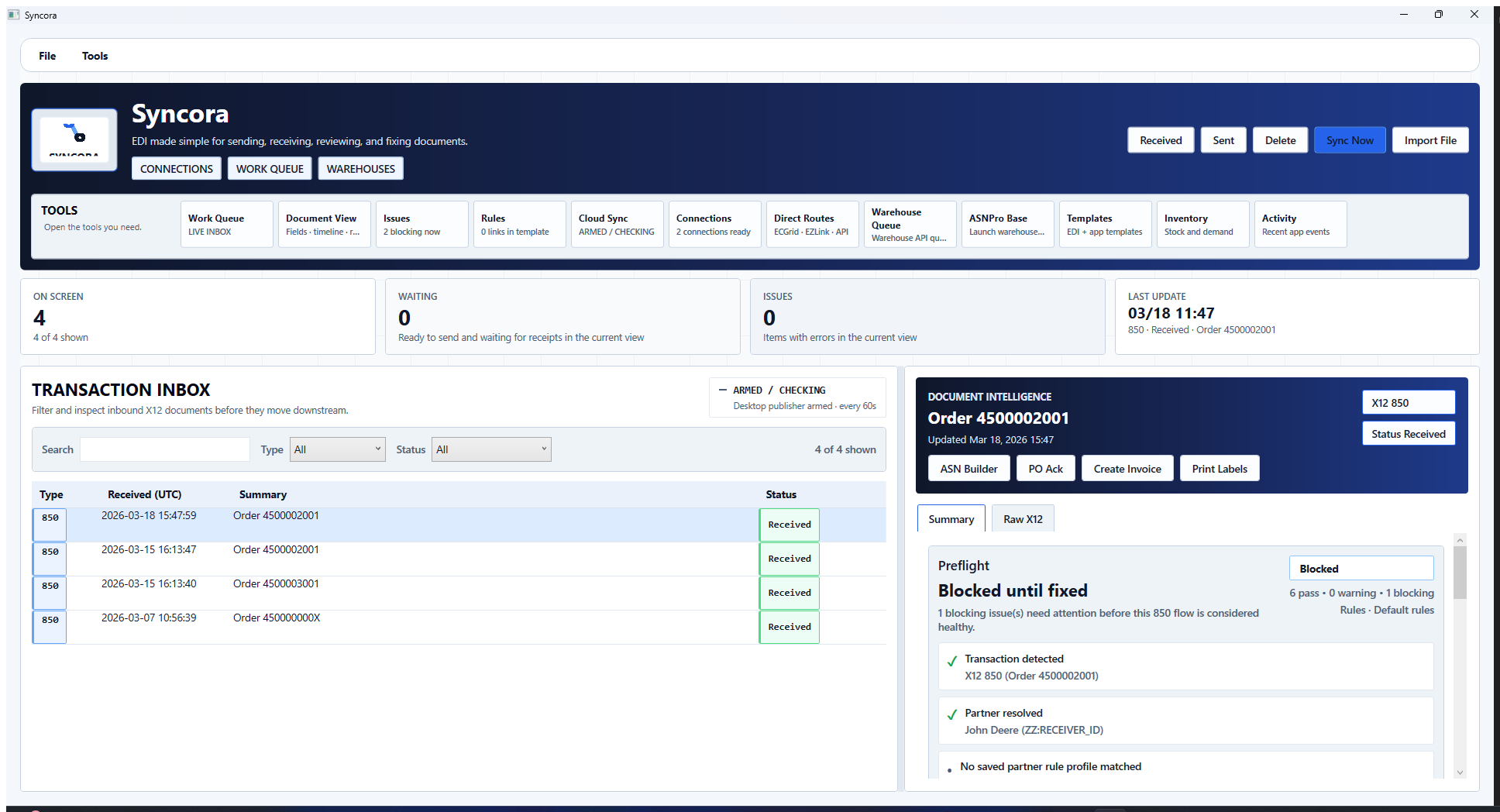
Received queue
Review inbound documents without leaving the inbox.
Incoming transactions, timestamps, summaries, raw X12, and document notes stay together so the next step is easier to spot.
Sent and outbound
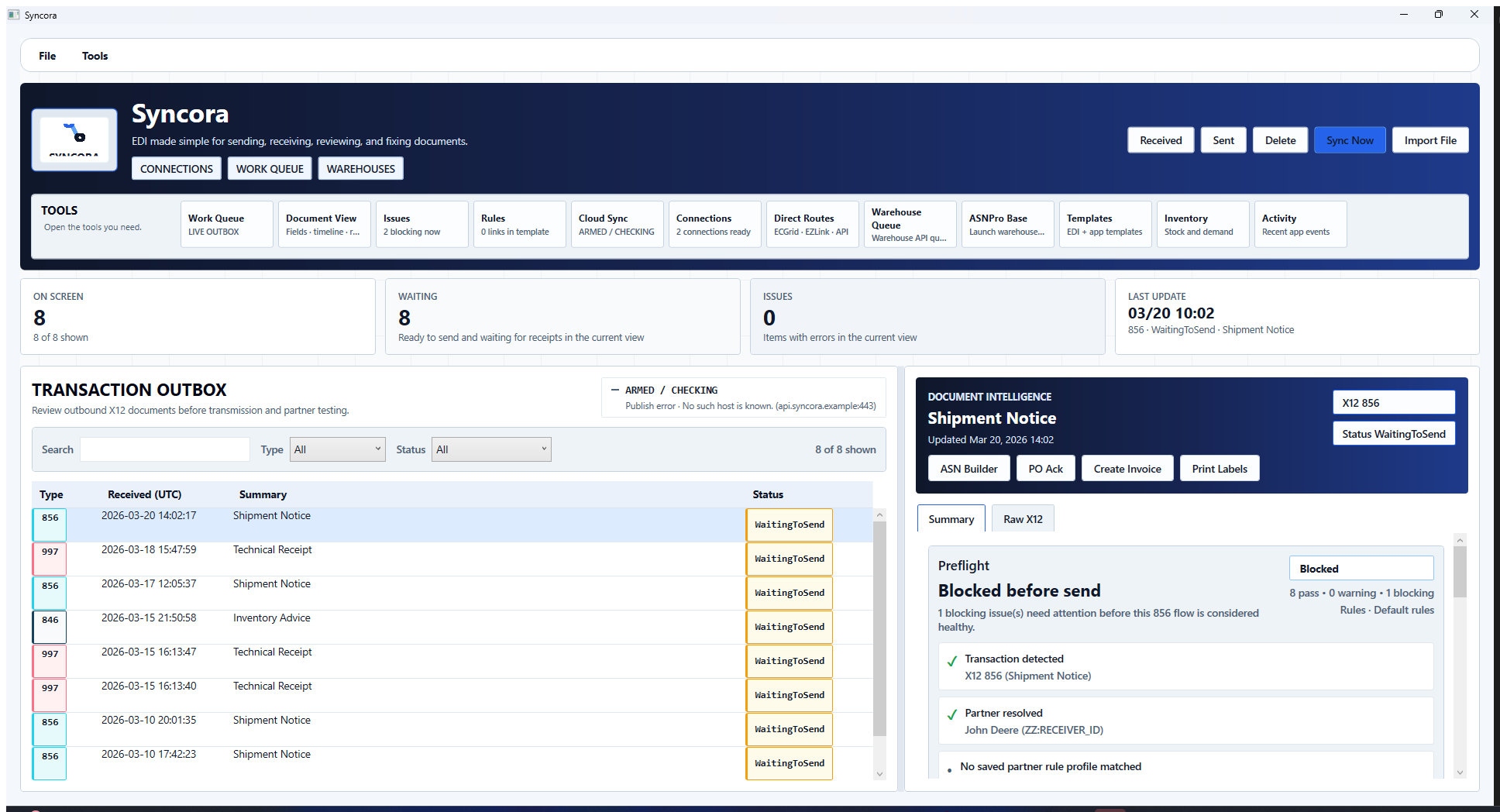
Track what went out and what happened next.
Inspect outbound documents, timestamps, payload detail, and ECGrid transport information in the same place.
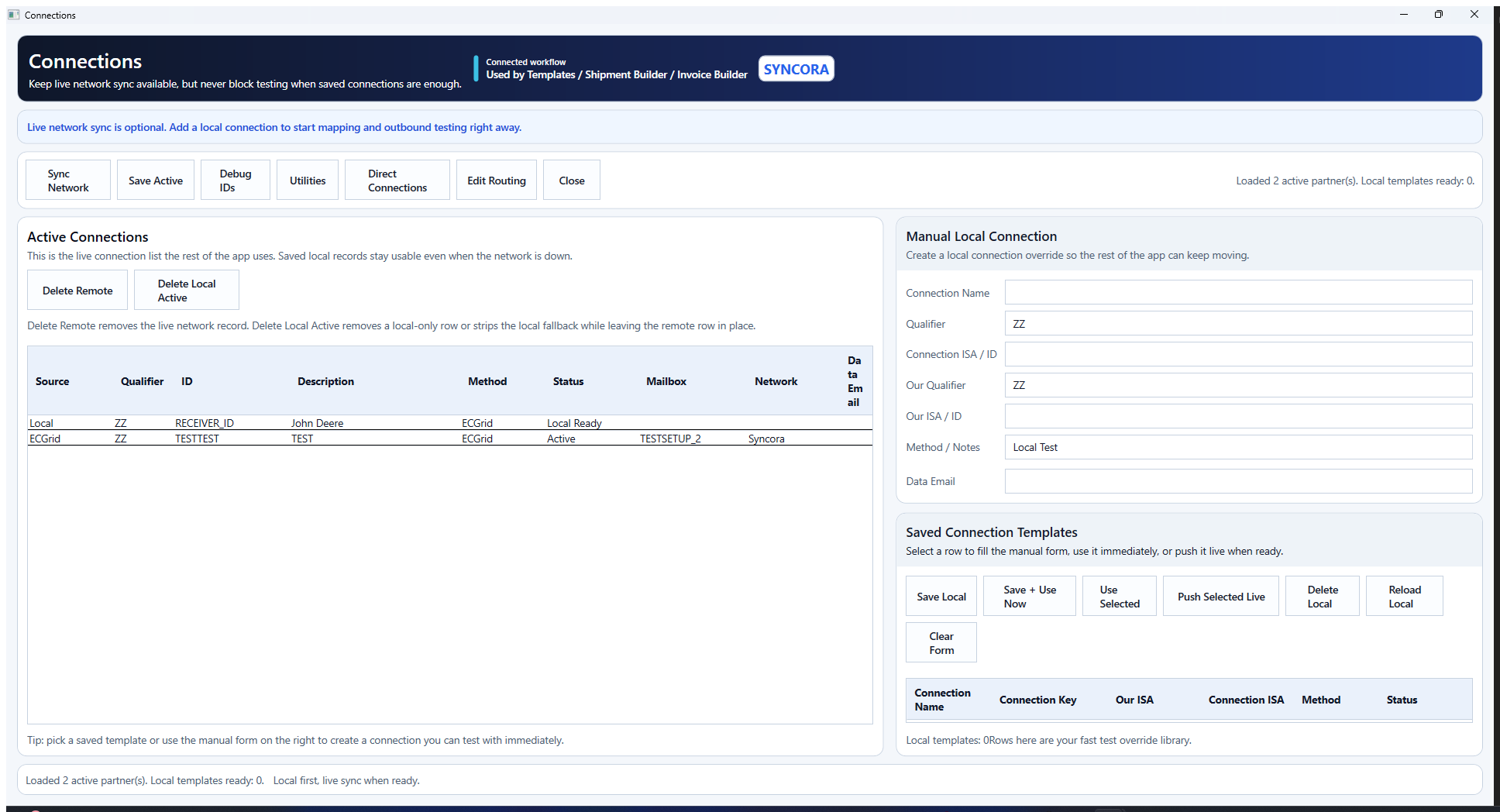
Partner setup
Keep connection logic and partner setup where people can actually find it.
Active connections, local communication methods, and partner setup stay findable instead of getting buried in notes.
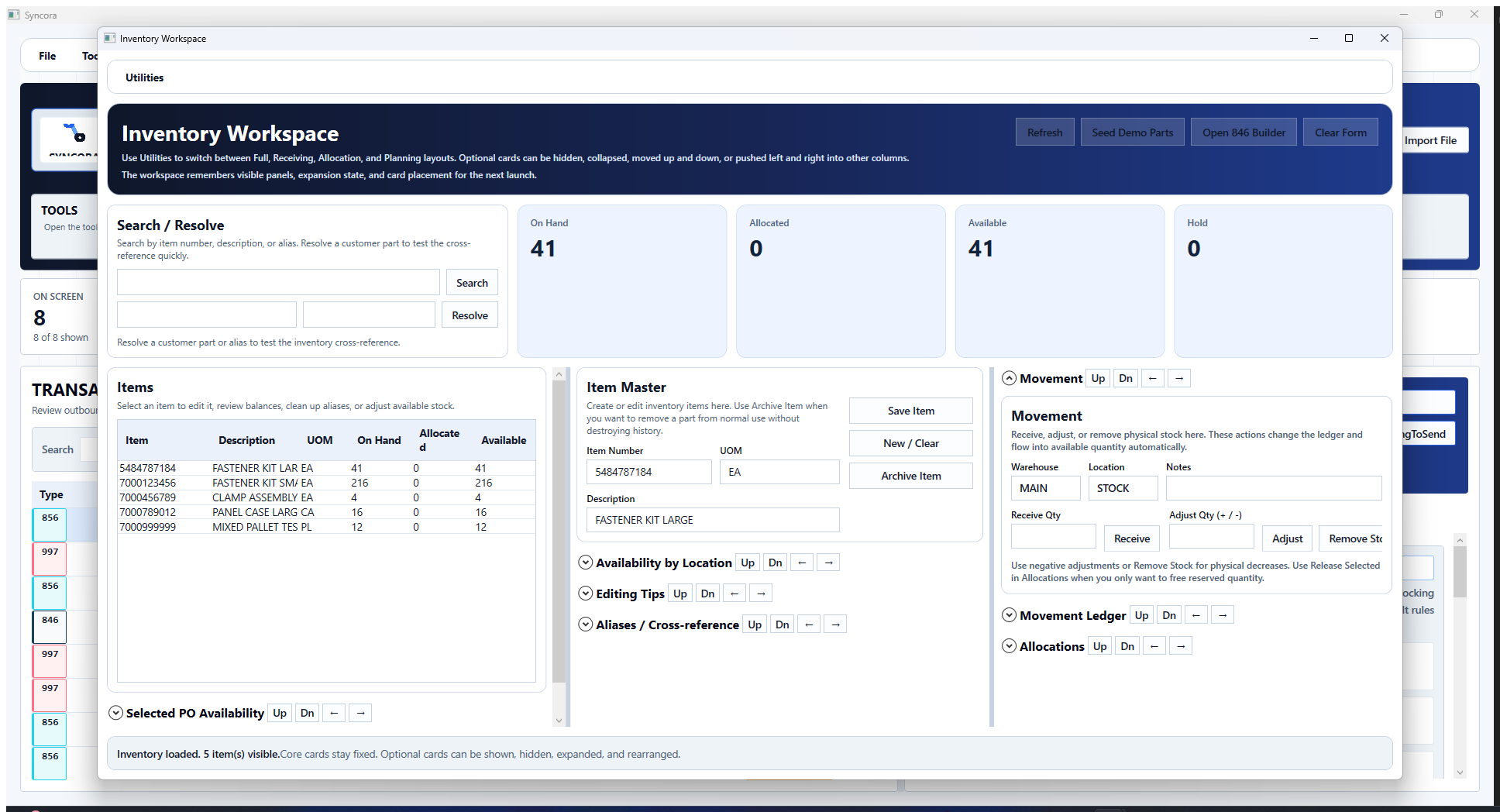
Inventory screen
See balances and movement while you build warehouse-facing EDI.
See on-hand, allocated, and available inventory while working on shipment and advice documents.
Free Tool
Need a quick X12, JSON, CSV, or custom preview?
Use the browser translator when you just need to paste a sample, preview a format, mimic custom text, or download a quick output.
The translator is for quick checks. The ECGrid send utility is there when you want send-side testing outside the main app.
Best Fit
Built for suppliers and distributors who need serious EDI without a giant platform.
Small and midsize operations
For groups that need to send, receive, fix, track, and keep warehouse data aligned without buying more system than they need.
Inventory-sensitive shipping
For businesses where shipments, availability, stock movement, and partner documents all need to agree.
Supplier and distribution operations
For teams juggling partner requirements, warehouse updates, and customer-facing shipment communication at the same time.
FAQ
Questions people usually ask first.
Which documents does Syncora focus on?
Syncora's main document set is 850 purchase orders, 855 purchase order acknowledgments, 856 ASNs, 810 invoices, 846 inventory advice, and 997 functional acknowledgments. It also includes a wider catalog for related retail, warehouse, grocery, finance, planning, and transportation documents.
Is Syncora software or a service?
It is software first: a Windows EDI app with a free browser translator. The goal is to give you control of the work instead of turning every small change into a ticket.
Is this meant to replace an ERP or WMS?
No. Syncora fits between trading partners and day-to-day operations so documents, shipment updates, and inventory can stay aligned.
Why does warehouse sync matter here?
Shipment documents should reflect real availability and real movement. Syncora keeps inventory next to the EDI work so stock updates do not become a cleanup project later.
Does Syncora handle partner-specific setup?
Yes. Partner records, mapping context, communication settings, and transaction-specific behavior are part of the app, so each partner does not become a fresh manual exception.
Who is Syncora best for?
Suppliers, distributors, and operations groups that need reliable EDI without buying a giant platform before they are ready for it.
What is the free translator for?
It is for quick preview and conversion checks in the browser: X12, JSON, CSV, custom formats, and sample mimic work. The Windows app handles the real send, receive, partner setup, and inventory work.
Contact
Want to see if Syncora fits?
If your EDI process is scattered across too many places, send a note and we can talk through what you are trying to clean up.
hello@syncoraedi.com
Share your partner flow, transaction sets, and warehouse process. We can show you where Syncora fits.